PLANETBROWSER

NOTE

This website is for your information only. All the information that we provided here is the types of information that we received and collected from books, studies and some research from the Internet and we try to collect and share all the best top information . .

Looking for something?

Subscribe to this blog!

Receive the latest posts by email. Just enter your email below if you want to subscribe!

Ipinapakita ang mga post na may etiketa na computing. Ipakita ang lahat ng mga post

Basic shopping guide for online shopaholics

1
Addicted to shopping online? We don’t blame you, given the kind of deals and products that are becoming available. A bit of caution, however, is needed to ensure that you are not swindled. Here’s our basic shopping guide for online shopaholics.

The ease and comfort of buying goods without stepping into a crowded retail store, or waiting for the right colour and right product to arrive, and  (most importantly) getting discounts in the bargain, are some of the key factors that draws more and more people to online shopping. But, this remarkable and comforting mode of shopping can be a nightmare if a buyer is not aware of the various nuances of the online business. Yes, it is easy but it is definitely not free from  deception and deceit. However, one can ensure that one is not tricked by keeping an eye on a few points.


Pay attention to every detail 
One of the most common tricks played on buyers in online stores is presenting  lookalikes of certain products with brand names that appear similar. A brand that sounds like a major brand or an imitation of a
high profile device from a high profile brand would be presented in such a way that a buyer would mistake it for the real thing. So, the first rule of online shopping is to pay attention to every detail, examining every aspect carefully, reading the terms and conditions, no matter how long they might be. And yes, a rule of thumb is that if a deal seems too good to be true, then there probably is something fishy involved.

Credit cards are safer
When it comes to payment, cash on delivery is the most popular mode of transaction in India. But, COD is not available everywhere and many buyers don’t mind paying ahead of delivery. Users paying through a card must understand that the risk is higher when one is paying through a debit card than on a credit card. A credit card offers more protection to a buyer. In case of a fraud or transaction gone awry, a user can refuse to pay and the onus is on the banks to settle the matter with the retailer. The user won’t lose his or her peace of mind over it as they might in case of purchase made through a debit card where the actual deposit would be debited at once and the process of recovery could be long and arduous.

The dilemma of warranty
Warranty on products is often shrouded in mystery. Often it covers only a certain part and applies only to specific damages. A user must be aware of what all is covered in the warranty or whether the device on the e-store is backed by manufacturer warranty.  For instance, some time ago, Lenovo announced that e-commerce sites like Amazon, Snapdeal and Flipkart, are not its authorized sellers and asked users to check the warranty entitlements before buying any Lenovo products from these portals. Users must check these aspects before buying a device. Also, one must find out if the brand has a service centre in the city they live in. This is important because a number of popular online bestsellers do not have service centres beyond major urban locations.


The online store should be a credible one 
The last few years has seen a significant increase in the number of online stores,  and they all offer discounts and deals. One might visit many sites but when it comes to buying a product, users should stick to a few trusted online stores. A user can also call up or send mails to the merchant mentioned on the site to verify and find out more details
about the product.


The importance of right
security protocol Sometimes online shopping can be a very risky business if the site in question does not have a secure encryption protocol in place. Sites that use HTTPS (Secure Hyper Text Transfer Protocol) for encryption provide a higher level of data security, especially personal data like passwords and card details used during online transactions. The benefit of HTTPS over HTTP is that it uses another security protocol called SSL (Secure Sockets Layer), which is used by a lot of e-commerce sites across the globe to protect customers  and keep online transactions confidential. Sites using the HTTPS carry a green address bar in the browser URL and start with ‘https.’

Saving passwords must be avoided
Most sites during purchase ask users to save their card details like passwords, card number, etc., for future transactions. They appear as selected by default and a user must take care to deselect these before moving further. Yes, it does seem more convenient to shop by saving all your card details online but take our word for it, entering the card data every time is far more secure.

Not all EMIs are same 
Almost all e-commerce sites give you the option of making payments through EMIs. However, one should remember that every bank applies different interest rates on EMIs. A buyer should check them thoroughly before agreeing to them. For instance, some banks like SBI charge up to 15 percent EMI while some banks like ICICI offer 12 per cent interest rates on EMI. Interest rates also vary depending on the tenure of the EMI, irrespective of the bank. The higher the tenure, the more the interest rate will be.

The cost of shipping
Last but not the least is to make sure the product is delivered without sustaining avoidable expense in shipping. Most e-commerce stores  keep a classification of regions for shipment. If the buyer is based in a remote and rural area, the online store is likely to charge something for shipping. If the delivery has to be made in a major urban centre, the shipping cost would be nominal or nothing. In case of cash on delivery, a small amount is also charged for transporting cash.
Read More »

PHOTOGRAPHY:LIGHT TRAILS colourful and creative effect

0
Light trails are a colourful and creative effect      that photographers can capture by employing long-exposure shooting on their camera. The basic principle of light trail creation is that by manually dropping a camera’s shutter speed to a very low level, light is captured by the sensor over an artificially long period of time, with every passing vehicle having its lights tracked and recorded over the visible distance of the road. To take a shot like this one, find a roadside vantage point in which no other moving objects are visible other than the passing vehicles. Second, mount the camera on a tripod, as stability is key while shooting long-exposure imagery. This is because if there is any camera shake while the unit’s shutter is open, then the captured light will lose its direction and smudge across the entire image. Next select the shutter priority setting on the DSLR camera and drop the shutter speed to the desired level – for shots like these, this means at least a 30-second exposure. Finally, automatically focus on the scene’s background and use an external remote to take the picture. Interestingly, the very same process is also used in light painting, a technique where the streaked light is controlled by the photographer manually, using light-emitting diodes (LEDs) to draw custom streaks across a dark backdrop and thereby essentially ‘painting’ in light.

Read More »

CAMERA LENSES:Tilt and shift lens and The toy town effect

0
There area wide variety of photography lenses out

 there that are designed for specific genres,such as macro lenses for close-ups,wide-angle lenses for landscapes and telephoto lenses for wildlife.Tilt and shift lenses,however,are considered pretty specialist and for good reason.These lenses are commonly used by professional photographers who want to eliminate the possibility of optical distortions when photo graphing architecture or even landscapes. Unlike standard lenses,tilt and shift lense scan be physically manipulated in order to adjust the plane of focus and perspective within an image.Tilt and shift are also two separate adjustments, both of which can affect a photo in different ways. Tilting the lens left,right,up or down changes the angle of the lens relative to the camera body,which gives you more control over depth of field,so you’re able to determine how much of the image appears in focus.Tilting is often used by pros to put the entire scene in focus, from front to back,or to create the popular miniature photo effect, which essentially makes depth of field much more shallow. On the other hand,shifting the lens up,down or from side to side enables you to include objects with in the photo currently outside the field of view,without having to tilt or move the camera body itself. This means you can photograph tall structures from the ground in their entire  by shifting the lens upward so that the top of the structure comes into view.This also prevents optical distortions such as converging verticals,wherea building appears to lean backward due to vertical lines leaning in


The toy town effect
A popular tilt and shift lens effect is turning a standard scene into a miniature toy town. This effect is possible thanks to the lens’s ability to tilt the plane of focus, meaning you can control the depth of field. By pointing the camera down and tilting the lens up, the focal planes in front and behind the subject you want to appear sharp, are thrown out of focus. The blurred areas now replicate a very shallow depth of fi eld you would only otherwise see in close-up macro photography, hence why the scene appears much smaller than it actually is. 

Using the shift effect can help you fit much more in a frame
Converging verticals When photographing a structure using a standard lens you have to point the camera upward to include the top and bottom of the building. This will distort the perspective result in converging verticals.

Standard lenses To avoid this with a standard lens, you would need to keep the camera level and shoot face-on to the structure. But shooting tall buildings from the ground means it would be impossible to capture the entire structure within your shot. 

Tilt and shift effect A tilt and shift lens enables you to keep the camera face-on to your subject and use a vertical shift movement to capture the entire structure without distortions. As the lens has a larger image circle, it’s possible to incorporate more within the frame.

Read More »

MOBILE PAYMENTS :HOW APPLE PAY WORKS

0
HOW APPLE PAY WORKS

Discover how the iPhone 6 combines NFC, Touch ID and built-in security


Loading payment cards
1 Cards are loaded into the iPhone’s Passbook app either by scanning with the camera or by typing details in manually.Each new card must be confirmed separately with the issuing bank to activate payment information links.

Selecting a card
2 To make a purchase,the shopper selects the card they want to use from within Passbook. Each stored card has been assigned a unique 16-digit Device Account Number,an encrypted token used in place of the real card number.

Identity protection
3 Unlike handing over a plastic payment card, when a shopper chooses to pay for their goods or service using Apple Pay,their personal identity and card number are kept completely private.

Authorising payment
4 The shopper taps their iPhone – with card selected – to the merchant’s NFC payment terminal and authorises the payment by placing their finger on their phone’s Touch ID fingerprint scanner.

Touch ID confirmation
5 Successful Touch ID authentication prompts the iPhone’s Secure Element chip to release the card’s unique Device Account Number, along with a transaction-specific dynamic security code that is used to process the payment.

Purchase completed
6 Confirmation that the transaction has been processed appears on screen and a subtle vibration and beep lets them know the transaction is complete. This is useful if the shopper has already pocketed their phone.
Read More »

10 Cool things you must know before 2015

1
World population on the rise 

The world population is predicted to reach 12.3 billion by 2100. Previous claims had stated that population growth would stabilize and the number of people on Earth would plateau by 2100,but new research has stated that increased fertility rates and life expectancy, particularly in Africa, is the reason for the rise.As a result, renewed population policies may have to be proposed.


Renewable energy gets a boost

A new type of battery has been made that could be invaluable to future renewable energy production. The lithium-antimony-lead liquid metal battery has the ability to store vast amounts of electricity. Utilising a negative electrode, the battery has a much lower operating temperature than previous designs and will maintain around 85 per cent of its original efficiency even after a decade of daily use.

Scientists create a shape-shifting metal 

Scientists have created a new type of liquid metal. Formed from an alloy of gallium and indium, the material has a bright future and is being predicted to self-repair electronic structures and circuits. A liquid at room temperature, the alloy is the shape of a ball, but goes flat when exposed to voltage

New truck will save lives 

Senior lecturers from Lough borough University have designed a new type of lorry that could save cyclist and pedestrian lives. The new-look cab will eliminate blind spots and increase the driver’s fi eld of vision. The model created by the team will have a cab that is 80 centimetres (31.5 inches) longer with a more rounded front. The emphasis will be on sight with a smaller dashboard but larger and more windows.

There’s a new treatment to regenerate bones 

Osteoporosis a condition that weakens bones–could be combated by an injection of calcium phosphate. This paste will contain stem cells encased in microspheres. Stem cells of ten struggle to survive when entering the body,but the casing will aim to safely transport the cells to the bones.

All-electric Formula E begins 

Electric racing cars took to the streets of Beijing as the first-ever Formula E Championship began.The first of its kind, the competition will look to provide the same thrill ride as Formula 1, but without the carbon emissions. It will run until June 2015.

Brains have their own (free) ‘calorie counters’

Our brains naturally works out the calorie content of different foods when we look at a menu. That’s according to neuro imaging research, which sought to determine how our awareness of calories infl uenced the brain. The study found that although calorie estimations were off the mark, people were willing to pay high prices for high-calorie food, showing their desire to consume it.

There are three types of Europeans

New research has suggested that the European  different peoples:blue-eyed hunters,brown-eyed farmers and an in flux of groups from Siberia.The findings were discovered by analysing genomes and shows that Europe was originally an area of blue-eyed hunter-gatherers before the arrival of brown-eyed farming communities from the east around 7,500 years ago.

We could build a lift to space 

A real stairway to heaven could be made in the future using the extraordinary properties of diamond nano threads. The new material was developed by researchers at Penn State University, USA and is composed of a string of carbon atoms. Created under extreme pressure, the nano thread is extremely tough and one of the main hopes for the breakthrough is to create a space-lift system.

There’s a new trip to Mars 

The latest NASA mission to Mars is named MAVEN and took ten months to reach Martian orbit. The satellite’s task will be to monitor the planet’s atmosphere in an attempt to find out why it is so devoid of air. MAVEN will look to find out what effects the Sun has had on the Red Planet’s climate throughout history and why Mars has lost all of its water.
Read More »

Windows 10: User experience better, more advanced and more comprehensive

0
A new Windows OS is in the making. Its prototype was shown off recently in California and it soon will be made available through Windows Insider Program for preview for developers and members before it is finally released for the general public some time next year. Windows 10 OS (yes, there will be no Windows 9) is full of surprises, but also treads on familiar territory with the focus on offering a more universal Windows OS. To begin with, the new operating system is designed in line with Microsoft’s new strategy which focuses more on cloud and mobile platforms. So, when it came to naming the product, Microsoft decided 
against naming it Windows 9. The
 company feels Windows 10 is a major leap and calling it Windows 10 conveys the message better.  Enterprise first Microsoft considers enterprise users as its most important customers. Windows 8 failed to impress many as it had very few things in common, in terms of design and use, with the previous operating systems. The focus was more on touch and the new tile interface and the old desktop experience was also given a new look and feel. If Microsoft was lauded for its innovation, it was also slammed for not keeping a balance between the old and the new. A lot of users felt more at home with a full-fledged PC and not a half breed tablet PC. Windows 10 brings that familiarity, known to users of Windows 7, back. It is going to be familiar to all Windows users no matter which Windows OS they are coming from, and is going to be compatible with all the apps and tools running on previous versions of Windows. Multiple devices, one experience The existence of multiple devices of multiple sizes is a dilemma that present day corporate world has to live with. For enterprise, managing so many devices can be a formidable challenge, unless they all can be handled through a single platform. Windows 10 is that single platform that can run on multiple devices of different screen sizes, offering a tailor-made experience on all. Windows 10 allows its users to manage all devices including PCs, tablets and mobile with one mobile device management interface. Security is another concern that enterprise wanted to be addressed better. Microsoft claims that Windows 10 is more secure than its predecessors as it separates and protects corporate data from personal data across all devices. Improving the experience The pace of evolution in tablets and mobile has been relatively more rapid as compared to PCs. Windows 10 is built on the premise of making the user experience better, more advanced and more comprehensive. Bringing back the old was not enough, so new features were added as well. Some notable features include: 

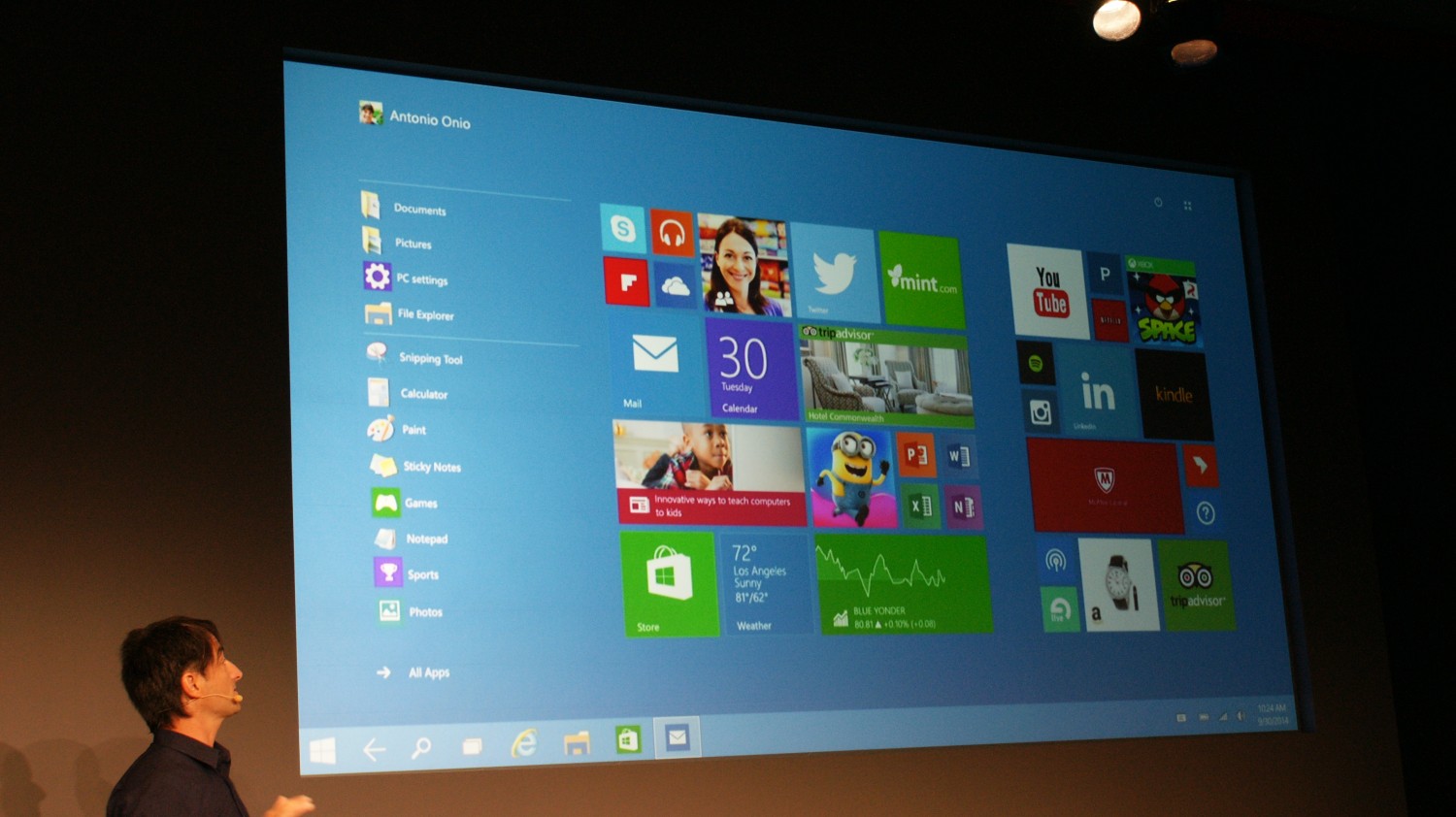
Start Menu- Leaving out the Start Menu in Windows 8 was a move that did not go down well with the Windows faithful. The new OS brings it back. And it doesn’t come alone but with some elements of Windows 8. A live tile inventory has been added with the Start menu. The inventory can be customized,  so can the apps on it but the most interesting feature is the ability to resize the Start  Menu.   

Title Bar- Windows 10 also brings back the title bar, and runs in a manner similar to the classic Windows apps. Users can drag it anywhere on the screen, resize and close it or minimize it. One can also lay out two or more than two Windows apps side by side, and keep them open simultaneously. 

Task view- A new button called Task View on taskbar has been added, enabling a user to move across swiftly from one task to another. This is going to be handy for users, as it gives 
them a glimpse of all apps running in the background, and allows seamless movement from one to another. 

Shortcut keyboard- The keyboard remains the most popular mode input mode on PCs. Windows 10 introduces a higher level of integration with keyboard. Professional users can jump to apps and control a great deal of action on their PC with their keyboard and achieve higher productivity in lesser time. 

From type to touch automatically- The touch aspect which confused many users in Windows 8 has been better handled in Windows 10. A convertible or hybrid PC will automatically shift to a tablet mode the moment a keyboard is detached. 

The new OS seems one of the most comprehensive reworkings of Windows we have seen. It attempts to bridge the gap between the past and the present editions of the OS, even while focusing on enterprise and attempting to improve the desktop experience. The consumer version of Windows 10 is expected only in the latter half of 2015, but its technical preview is available for download. Stay tuned for more news in this regard. After all, there’s a new Windows in tech town! 
Read More »

2015 Smartphone Games and Apps You Must Dont Miss

0

FIFA 15 Ultimate Team
The latest edition of one of the most popular mobile football games around, FIFA 15 Ultimate Team is very much like the previous edition of FIFA, but with a completely new game play. Unlike FIFA 14 where you had several modes, this game is one big career mode where you start from scratch with zero cash and no experience. What impressed us most is that the game has done away with the one-time payment to play the career mode. Payments come afterwards and will be required only if you do not feel like starting out with an inferior team and very little cash. The interface is more jazzy and colourful than in previous editions, but anyone who has played FIFA 14 will be able to figure it out easily. Controls have been improved and unnecessary ones like skill move have been left out, simplifying matters a great deal. Touch options are available but can only be used side by side with gamepad controls. Overall, it is a worthy addition to the famed FIFA series, complete with licensed teams, stadia and player likenesses. A little note: you need to be online to play this game. So keep an eye on the data consumption meter.

Badminton 3d
Despite being a major sport in its own right, badminton has not really inspired developers to come out with a game to whet its fans’ appetites. So you can imagine how delighted we were to see Badminton 3D, which is perhaps the first notable game based on the sport on the mobile platform. It is a free and small game but offers very engaging and thrilling gameplay. One can embark on an international career, play in leagues, tournaments and engage in a fast-paced exchange of smashes and parries. Jump and smash is all you have to do, keeping an eye on the timing bar. As players onscreen respond on their own, based on your timing, gameplay is easy to learn. Swiping to give the shot direction works well but mastering the timing bar is tough. In multiplayer, you can compete against online players but the part that really interested us was the split screen mode that lets two players play on the same screen – one on either end of the screen representing the player on their side. No, it is not in the class of Virtua Tennis when it comes to free movement and gameplay controls, but it reminds us more of the very basic and simple Stick Tennis. Considering the paucity of badminton games in the past, we are not complaining.

Asphalt Overdrive
Gameloft’s latest racing game Asphalt Overdrive is nothing like previous Asphalt games. It is small, simple to play and free of cost. Its biggest attraction is the graphics, as it offers the same level of detail and special effects and beautiful scenarios seen in previous Asphalt games. But there the similarity ends. Unlike in other Asphalt games, you have no control over the speed in Overdrive. Acceleration is automatic and it takes a brush against other vehicles to slow you down (if that happens to be a truck or bus, it pretty much wrecks your car). The game offers multiple racing modes, such as Getaway mode (where you run from police), Destruction, Daily Test, Restricted Run and Stunt Run. You start with the Getaway mode and the rest become available gradually as you progress. The number of cars is limited but there is ample amount of customization available. Gameplay is too simple but time consuming and can become boring as the racing modes are too unconventional for racing buffs. It is more suited for those who are not much into racing but want something to while away time. Or want just a basic taster of the Asphalt magic

FlipBoard News magazine
FlipBoard News magazine magic comes to Windows Phone One of the most popular news reading apps, Flipboard, has finally arrived on Window Phone. The app was one of the first to present news in the form of a digital magazine, whose pages could be “flipped” (hence the name), and was initially designed for tablets (it was first shown on the iPad). It has since made its way to phones and to Android (it was an iOS exclusive for a while), and now it is on Windows Phone too. While the app will work on just about every Windows Phone that has been updated to Windows Phone 8.1, it really comes into its own on the larger displays seen on the Lumia 1520, 1320 and most recently, the 830. The app remains as amazing as ever with different tabs representing different sections, and tapping on each revealing page after page of related content. The app has been tailored for Windows Phone and looks quite outstanding, but a few bugs remain - there seems to be no way to choose your own topics or save pages for offline reading, although you can create your own Flipboard magazine if you wish. Still, we think it is a must-download for anyone who loves following the news and likes to read it in a magazine-like format on their handset.

Blippar Point
Imagine being able to get additional information about something by simply pointing your phone at it? Well, that is what Blippar sets out to achieve. Of course, there will be those who will insist that there is nothing new in this concept and that apps like Layar (which has been acquired by Blippar) and Google Goggles have been trying to do the same for a while now. However, what makes Blippar different is the amount and vastness of content that it can show. All you have to do is download the app (it is free) and then simply load it when you see anything that has a Blippar logo - a page, a container, a signboard, anything. And then watch everything change as fresh content gets loaded on to your phone - you could see an entire video, become part of a game, watch a presentation, and do much more depending on the amount of content uploaded by the party. It is a whole new way to experience content and adds a completely new dimension to reading anything. Yes, you would need a decent Internet connection to make the most of it, but given the rate at which many people are jumping on to the Blippar bandwagon, we really think this is one app that you should download and keep ready, for you never really know what it might reveal on a seemingly routine page or object. 

Adobe Color CC
It might not be making as many headlines as the likes of Instagram, but Adobe has been working away on its suite of mobile apps and has been delivering some very powerful apps related to image editing on mobile devices. And one of the most interesting of these is Color CC, which amazingly extracts colors from photographs. Earlier known as Kuler, the app has just one purpose - to extract colour from scenes. Sounds amazing? Well, that is what it does. All you need to do is launch the app and the camera from within it and then point it at an object, and in front of your eyes, the app will pull out different hues that it sees there. You can save them, tweak them and use them later if you wish. You can even take colours from existing photographs. You can build your own colour themes if you are the artistic type and share them with your friends. It is all very amazing and the best part is that it is totally free and incredibly easy to use. All of which makes it a must-have for those with an artistic bend of mind, and even for normal users, just for its jaw-dropping simplicity.  It is currently available only for iOS users, but hopefully an Android version should come along soon. 

Glympse KeyBoard 
We have been huge fans of Glympse, the app that lets you share your location with specific people - all you need to do is send a message or a mail to person through the app and they can track your location on a map. And now, Glympse has come out with an additional app that lets you do things even faster. In the original app, you have to launch the app and then type in the name of the person to whom you wish to send your location. Well, with Glympse Keyboard, the process gets even faster - you can actually send a Glympse from anywhere. You might be writing a text message, composing a mail or just searching for something on Google - all you need to do is have a text entry box open and you will be able to share your location. You can do so either by choosing ‘Quick Send’ from your input methods (this involves pulling down the notification bar) or actually using the “Full Keyboard” which actually replaces your regular keyboard with one that has a big Glympse button bang in the middle of it. All you need to do to send a Glympse is tap the button. Location sharing just got a whole lot more simple, which makes this an app that we think is well worth a download, even though we do wish the full keyboard had more features. 


Read More »

Find Love With these Sites

2
Hindi available ang buod na ito. Mag-click dito para tingnan ang post.
Read More »

Hack Attack!

0
DATA THEFT: PASSWORDS STOLEN According to security experts at Hold Security, Russian hackers have stolen 1.2 billion passwords, alongside their usernames which included 500 million email accounts. That being said, the astronomical numbers of accounts stolen is likely the result of several hack attacks that were made recently.

HOSPITALS: PATIENT DATA STOLEN About 4.5 million patient data records of American hospital operator Community Health Systems were seized by cyber criminals. According to the security service provider TrustedSec, the hospital chain was a new victim of the Heartbleed SSL bug. It was also discovered that the attack likely happened as early as April or June, and the culprit, likely a Chinese hacker group were not able to get their hands on credit card data and medical files.

FLIGHT MH370: HACKER ATTACK ON INVESTIGATION DATABASE Months after the mysterious crash of Malaysia Airline’s MH370, it was discovered that a hacker group attempted to attack the investigation’s database. A spokesperson from Kuala Lumpur said that the data about the investigation status of the case was stolen. It was also mentioned that the attacks appear to have originated from China, and that the affected computers of the investigators were infected with malware.

 Hack Attack

Millions Affected By Hack Attack Recently, up to 12 million websites may have been exploited by attackers who took advantage of a bug in the widely used Drupal software as these sites use Drupal to manage web content and images, text and video. Drupal had issued a security warning saying users who did not apply for a patch recently should assume they had already been hacked. It was said that the automated attacks took advantage of the bug and allows the attackers to take control of a site. It was estimated that up to 5.1 percent of the billion or so sites on the web use Drupal 7 to manage their content, thus increasing the number of sites that requires patching up to 12 million

Read More »

Breaking The Myth of Laptop and PC's

0


MYTH 1: Using a laptop back reference to your lap will fry your *ahem* babies

I wont bore you by now an anatomy lesson, but the curt of it is that your swimmers work up slower and are less potent the hotter it is all along there. If you noticed, the underside of laptops tend to profit beautiful hot taking into account in use, and thats behind some flesh and blood song surrounded by it and a flat surface. Remove that flesh and blood vent and you might as dexterously be sitting in a tub a propos a ember pit.

Dont cause problems even if; researchers are yet not determined if theres attend to correlation together along moreover laptop heat and infertility. They also mean that there are single-handedly long-term effects later than you regularly use your lap for your laptop. If thats your idea of contraception, along with save that bad guy concerning them gems.

MYTH 2: Antivirus software is the subside-all and be-all of security
Just afterward your vaccines, antivirus programs can unaided detect and call off the common threats they were meant for. The difficulty is, the more malicious and extreme attacks were coded specifically to bypass these safeguards. Browsing sites, plugging in a flash hope, and even reading a PDF file can make impure your system following a virus if the hackers are deviant and ingenious sufficient. When you almost related to the Internet, its best to espouse to that youin the region of going to profit attacked. 
Even international businesses get their servers hacked all taking into consideration in a even though. What can you attraction off subsequently to protect yourself? You can subside browsing the Internets underbelly and attach when the obvious, ably-behaved sites for starters. You wont win a connection iPhone through those clickable ads. Trust me, Ive tried

MYTH 3: Apple Macs are virus-free
Let me scrutinize you something. If you were fishing and you had two spots to add: one behind tons of regular, easy to catch fish; and marginal as well as without help a handful of seemingly special fish that arent as easy to bait; later where would you throw your pedigree? 
You'd select the first spot, right? Its the connected amid than the Windows and Apple full of zip systems. Because the Windows OS, is more widespread, and has a wider fan base, it makes prudence to code a virus, malware, or spamware for the numerous Windows users. Think of it as the illegal mannerism of dynamite fishing. You might not profit them all gone one fasten, but at least you caught a significant amount in the blast. 

Dont setting too sociable if you in report to a Mac devotee, though. There have been noteworthy attacks in the codicil, and as more and more people shift to the Apple habit, we can expect that the OS virus database will slowly add to. Currently, Macs are lonesome virus-proof because coders and hackers wont reap too much from them. Yay, us Windows subscribers!

MYTH 4: Ctrl+Shift+Del will completely delete data from a drive
Weve often been told that Del just sends files to the Recycle Bin, and Ctrl+Shift+Del continuously deletes them from our computer. While seemingly real, these aren't fool-proof methods of erasing our data. Keying in these commands just causes our computer to conceal the file entries around our displays but their remnants are still upon the hard hope, retrievable using special recovery software. 
Thats deafening news if you accidentally erase important things. If for everything footnote you visvis in fact burning behind hint to wiping data, you should make, copy, or download files regarding to the steer as to overwrite what you sore spot constantly deleted. 

MYTH 5: Computers are changing our nap pattern
This is deeply genuine, and not just because we use computers until the wee hours of the hours of daylight, spoiling ourselves in the manner of Facebook posts and cat memes. Wevis--vis nimble to nap because our body creates the hormone melatonin, the production of which is slowed beside by open. That explains why wein the region of happening and more or less subsequent to the suns out. Advances in technology have made it in view of that that weregarding never too far away afield from a fresh source, consequently messing subsequent to our evolutionary programming where night epoch equals beside epoch.
So should we go previously to shrouding ourselves in the dark for a enjoyable nights land? Good one. Theres no unintended wed be putting after that to our gadgets for some measly snooze. We can, however, slant the screens brightness all the way all along, as ably as have an effect on its hue in order to pronounce-calling our eyes less.

MYTH 6: I use Incognito mode. No one will ever catch me!
False. If you right of entry the fine print concerning the infamous namelessly window of browsers which, allocates be honest, no one really does you'll sky that it unaided protects you from those using the related computer. While going namelessly means that you going on for browsing history, cookies, and cache wont be saved almost your system, it append as heck wont protect you from your company server and internet sustain provider who still make a get your hands on of recommendation occurring for your behavior. To put it simply, namelessly does not aspire anonymous.

Read More »

Information is a weighty weapon,wield it wisely

0

The internet is a marvellous place, but, as in the real world, you dependence to receive omnipresent precautions to save yourself safe  the thesame mannerism you lock the stomach entry at night and put your seatbelt in version to by now driving your car.The key to staying safe online  avoiding nasty surprises such as identity theft and hacked accounts  is taking easy precautions such as choosing safe passwords, using security software, keeping software in the mood-to-date and restricting what opinion websites can stockpile upon you.

Fortunately, the basic steps are easy to have enough child maintenance, and this benefit lays out practical proceedings to save your computer in colossal fettle and lead you save run of your data.

Password protection
With an ever-increasing number of online accounts  from email and banking facilities to film and shopping sites  regarding the daily web agenda, remembering all those passwords is increasingly hard. Yet safe passwords are the first parentage of defence for keeping your personal pay for advice in check, and experts all the time setting that you shouldn't use the same code for all your accounts.

Computer security settings
In the same habit we lock doors and windows in our homes, security software settings save our PCs locked going on safely. There are precautions built into security software to help save you safe online  but lonely if you save it going on-to-date, use a first-rate software suite, and adapt the settings to war your needs. 

Secure and private online browsing
Browsing the web leaves a digital 'paper trail' concerning your PC and nearly the subject of the subject of the servers of websites you visit. 
On shared computers this can be a sore  for example, taking into account a relatives promoter finds history of a birthday power purchased as a incredulity. Find out how to browse and shop anonymously, gone directions for the main web browsers

Clearing personal data
Old hard drives, mobile phones and thumb drives contain a loads of recommendation that could be used by identity thieves to cause sick-treat. Properly deleting data back disposing of primeval electronics is valuable, and we've run through each and every one one the options for clearing out digital clutter in the at the forefront decommissioning your early PC.

Clearing cookies
Websites place cookies (little files to identify users) going regarding for your computer to benefit them child maintenance track of your interests and settings. However, third parties, such as advertisers can furthermore fade away these cookies onto your PC, often using them to advance going on targeted advertising the length of your wishes. The trick is to savings account cookie settings in order to make the web usable, though at the same era blocking unadulterated cookies that can be intrusive.
Read More »

A Secret Weapon The Auto-tune

0
ITV was criticised in 2010 for ‘auto tuning’ contestants’ voices on The X Factor singing audition programmes. The technology is employed to tweak dodgy vocals into the polished sound we now expect on TV, but how does it work? Auto-Tune is the brand-name of the pitch-correction software from Antares. Once the key and scale of a recording are set (by the sound editor or by the software), Auto-Tune analyses every note for deviation from target notes in the required scale. For off-key notes, the frequency of the output signal is altered so the pitch is corrected but the recording retains the voice’s characteristics. This technology is now used in most commercially recorded music and used well, it’s undetectable. Bad auto-tuning can be heard as bubbly or jagged changes in pitch. Best results are achieved by only tuning obviously off-key notes, rather than the whole recording. Now, if only they could work out how to add the software to karaoke machines.
Read More »

What Will To Make Be Like In 100 Years ? How do you make a perfect app

0


The first part of app development is designing how your app will look. For this you’ll need stencil equipment, supplied from companies like UI Stencils, to sketch out your app design. These physical templates allow you to sketch the layout of each page to determine button layout, image locations and other information. Once happy with your design, you’ll need to build the app in an Apple or Android environment. This can be done on programs such as Xcode and MonoDroid, which let you code in C – a computer programming language that creates lists of instructions for a program to follow – so you can visibly see the results of your actions. This allows you to build links between pages on your app and assign functions to buttons. Once you have fi nished building your app, it must be loaded into a simulator supplied with the developer kit for Testing. You can then load it onto your iPhone, iPad or Android device for furtherdebugging, until it’s ready to be uploaded onto the App Store or Android Market,
                                                                                                     

1. Design
First you’ll need to sketch out how you want your app to look,and then use a stencil tool such asUI Stencils to translate this to an iOSor Android building tool.
2. Build
Buttons and user interface elements are laid out in an Interface Builder, using programs such as Xcode and MonoTouch to define where and how things are placed
3. Code
Development applications such as MonoTouch, MonoDroid and Xcode are used in tandem with the Apple and Android development kits to develop the app into a working program
4. Refine
Once you have a good,solid system working in the iOS or Android developer kit simulator,the app can be loaded onto an iPhone or Android device for testing
5. Submit
An application submission pack can now be created with the digitally signed app, and, if approved, the app can be uploaded to the App Store or Android Market for others to download


Read More »

Windows 8 Push Button Reset Function 101

0

Push Button Reset
When you encounter a problem with your PC, be it performance related or otherwise,
you can now undergo a surprisingly fast process in which Windows 8 is quickly wiped
out and reinstalled in a factory-fresh condition. This doesn’t require mucking around
with a Setup DVD or USB media, and it won’t take half the day as it did with Windows 7.


Instead, Windows 8 includes a new feature called Push Button Reset, and it very well may be the single greatest new feature in this operating system.


WIPING OUT WINDOWS 8 AND START OVER
STEP BY STEP

To access the Metro-style interface for Reset your PC,

  • visit PC Settings and navigate to General.
  •  Near the bottom of the list of General PC settings, you will see the options, Refresh your PC without affecting your files and Remove everything and reinstall Windows. These represent Refresh your PC and Reset your PC, respectively.
  • Now, follow the instructions in one of the following two sections, depending on which you’d like to accomplish.

When you click the Get Started button under Reset your PC and start over, a fullscreen
Metro-style notification like this one.


This notification alerts you that the PC Reset process will delete all of your personal
settings, files, and apps.

Click Next to continue.

If you have more than one drive, PC Reset will ask whether you’d like to remove
all files from all drives, or just from the drive on which Windows is installed.

 Make a choice, and then PC Reset will ask you to choose between quick and thorough fileremoval types, The second, more thorough option is useful

if you wish to sell or give away the PC to others, but the first, quicker version is what
you’ll want when you’re simply resetting the PC for your own uses.

Next, PC Reset declares that it is ready to reset the PC. Click the Reset button to continue.
PC Reset will reboot the computer and quickly reinstall Windows. Your customized settings, data, and apps will all be deleted. After a few minutes and a few reboots, you will be presented with a shortened version of the Windows Setup procedure, during which you will agree to the Windows license terms and then complete the out-of-box experience (OOBE), where you configure some features and sign in for the first time.


Read More »